
 Translate
Retention schedules
A retention schedule is an important resource and tool that provides information about how to manage records throughout their lifecycle, including compliance with legal retention requirements. All King County retention schedules are displayed in the table below.
All schedules on this page are based on, and compliant with, Washington State records retention schedules. Information on this page is current and is automatically updated once per day. King County employees should only use retention schedules on this page to manage their records. Avoid using any older versions or exports of retention schedules, as they might be outdated.
King County Records Retention Schedules
Start by using the yellow bars below to select your agency (usually Department-Division-and-Section), which will then filter to display your agency's record categories. Then, use the dashboard features to search, sort, or browse through your retention schedule. If you have questions, want to add categories, or make changes, please contact us at records.management@kingcounty.gov.
Instructions and help
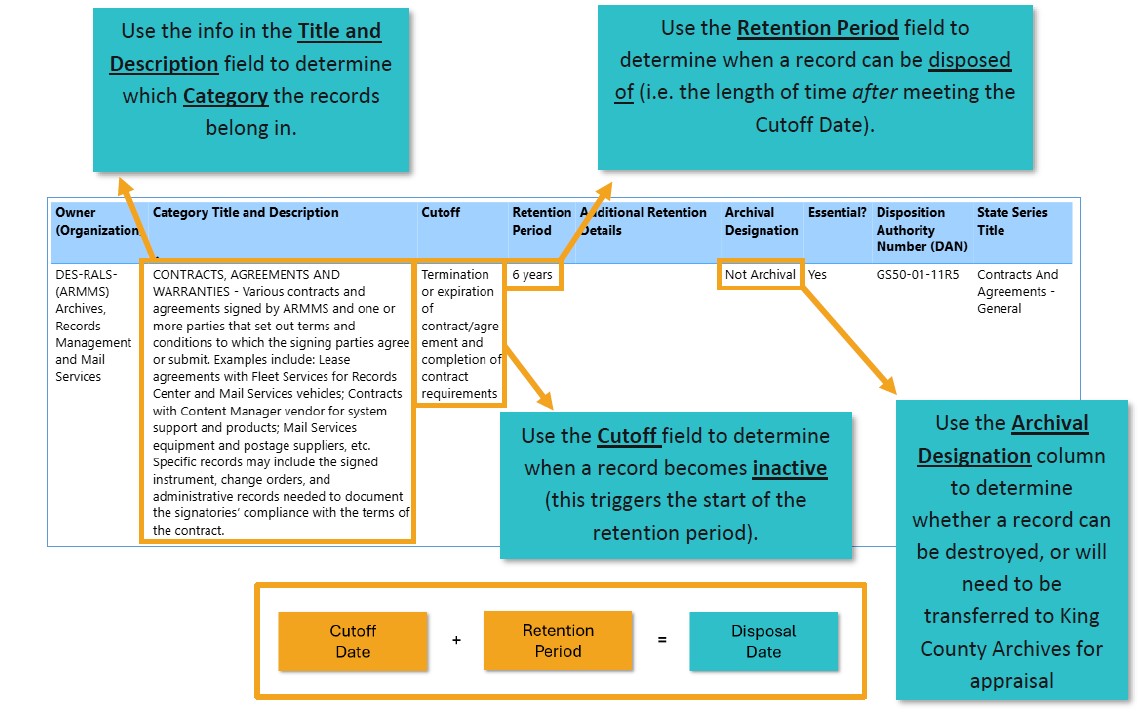
The graphic above provides some basic explanations about what the different retention schedule elements mean and how they can be used. For more guidance, you can also review our recorded training How to Use Retention Schedules (external link, 1 hour video). Our guidance Records Lifecycle Flowchart also provides some context about how to use a retention schedule and different actions to take for records depending on where they are in their lifecycle.
How do I search my retention schedule?
In the Search box above, type any word or phrase that you know of and that might be in the title or notes/description of the record category. For example, enter budget to find all categories that contain the word budget in the title or descriptions. If, instead, you want to search the DAN (Disposition Authority Number) or state series title, select those options before performing the search. You can also use your browser's search function (Ctrl + F) to search what is currently filtered/displayed.
Do not use quotation marks when performing searches for phrases. Instead enter phrases without quotation marks.
How can I export my retention schedule?
Export from this page
- Put your cursor anywhere in the first line of the schedule you want to export
- Hold down the Shift key then click the down arrow key until you reach the bottom
- Right click anywhere on the schedule and select Copy and then Copy Selection
- Open a blank Excel spreadsheet, place your cursor in an empty cell (usually A1) then press Ctrl + V
OR, Export from Teams
If you want to export the data in these retention schedules to an Excel spreadsheet, a different option is by viewing them on the Agency Records Management Dashboard on the county's internal Records Management Network Teams site. From there, you will need to re-filter by agency. Then follow the instructions on that dashboard to Export to Excel. You might be directed to request permission to view that dashboard.
How do I update my retention schedule?
To request any updates to your retention schedule (including adding additional categories, removing obsolete categories, or language changes/rewording) please contact the County Records and Information Management Program (CRIMP) at records.management@kingcounty.gov. You can also contact your records management lead and/or agency records officer and coordinate your suggestions with them.